How Programmers Spend Their Time
by Malte Skarupke
I submitted a tiny patch to flash attention. The necessary typing for the change takes less ten seconds, but the overall change took more than ten hours So where does the time go?
It started when coworker had a bug where cudnn attention would crash randomly. We looked at his unreleased changes and concluded that they couldn’t possibly cause this, so we suspected that we had a lingering bug that was exposed by making harmless changes to related code.
Step 1, a few hours: My coworker tried to figure this out just by running the code repeatedly, trying out various theories. The bug was hard to reproduce so this took hours without much progress.
Step 2, 1 hour: I thought this is a good reason to try out compute sanitizer. It would be easiest to just run it on our existing tests to see if it finds any issues without my coworker’s changes. But the tests run on another box because they require certain GPUs, which means you have to run the tests through some layers. Unfortunately compute sanitizer really wants to be in charge of the program, so we have to convince those layers to let compute sanitizer run the whole thing. It keeps on failing and we can’t figure out why, until eventually I suspect that the issue is that the tests run in a sandbox, and the sandbox is strict enough that it breaks compute sanitizer somehow. This turned out to be true and we probably wasted an hour together.
Step 3, 10 minutes: Run the tests outside of the testing framework. This is surprisingly easy, taking just five minutes. Compute sanitizer immediately finds a problem. Well, almost immediately. You have to know to turn off the pytorch caching allocator because it hides memory issues. If I hadn’t known that, I could have wasted hours more.
Step 4, 10 minutes: Investigate a theory that we had: We were padding one tensor, but not a related tensor that really feels like it should be padded, too. I try to use torch.nn.functional.pad but it doesn’t work for padding the batch-dimension. So we just use torch.expand and torch.cat together. This takes like ten minutes and the bug is still there. Then I notice another tensor that should also be padded, which takes seconds to try out now and finally our cudnn invocation runs cleanly through compute sanitizer. But a nearby test for flash-attention is failing in compute sanitizer.
Step 5, 20 minutes: The padding fix didn’t fix the original issue, so my coworker decides to look more into it on his own and I look more into why flash-attention is having issues. First check if we’re doing something obvious wrong. This takes 10 minutes and I find nothing. Then check the flash-attention code. Compute sanitizer gives me a line number and it fails on an interesting line related to running in deterministic mode. That’s not used often, so maybe that’s why the test is buggy. I tried to understand the index math in that line but that led nowhere, so instead I just grepped for where that variable even comes from, and there is a glaringly obvious use-after-free bug:
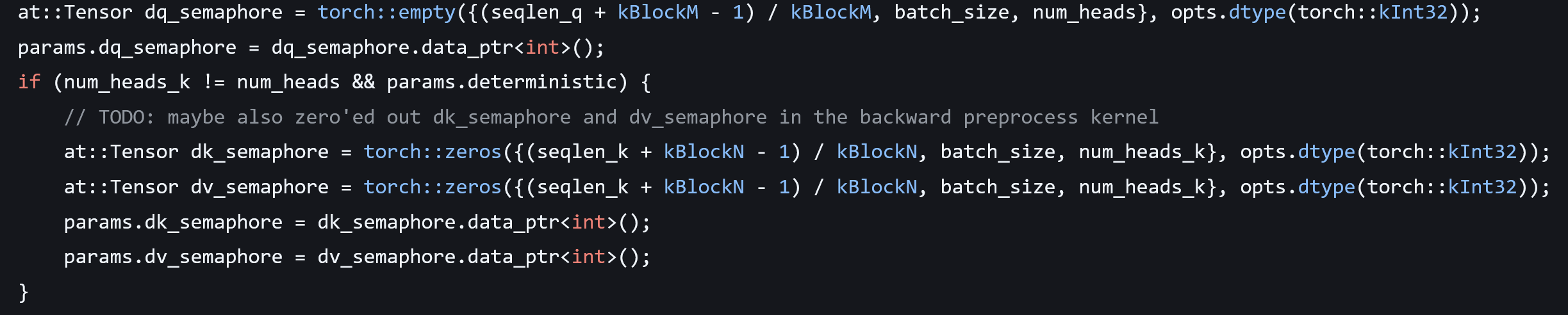
The dk_semaphore and dv_sempahore will go away at the end of the scope, but the data_ptrs will still be used and will point into memory that’s no longer valid.
Fixing this would take seconds (just default-construct the tensors outside the “if”) but we’re just using flash-attention from pip, so I would have to build a new wheel to confirm the fix.
Step 6, 2 hours: I decide to build this on my home computer because experience shows that it’s easier to get random source code to build on personal computers where I can freely install anything from apt-get or download random things from the Internet. I download the flash attention source but don’t actually know how to build it. “make” doesn’t do anything even though there is a Makefile. The readme says to use “python setupy.py install” which immediately prints a message telling me to not run this command and to use some other thing instead which I hadn’t heard of before. But then it does the work anyway despite that message, so I stick with it. It fails with “unsupported architecture compute_120”. I grep for where that comes from, somehow this thinks my PC supports newer things than it actually does. I try disabling it in setup.py, but pytorch does the same thing and I can’t modify that. So instead I try to figure out why it thinks compute_120 is supported when it actually isn’t. Oops, turns out I’m running ancient CUDA 12.0. I decide to upgrade to version 12.9 instead (I avoid 13.0 because that might have unknown compatibility issues). Now the build works, but it’s super slow. After 20 minutes I kill it and rerun it with more parallelism. This OOMs. So I try again with the original setting, which now OOMs as well. So instead I run with even lower parallelism, which makes the build even slower. I decide to call it a night. Unfortunately I can’t run the build over night because the PC is in our bedroom and the build makes the fans spin loudly.
Step 7, 45 minutes: Everything is broken. For some reason the build doesn’t work the next morning. It says no Nvidia runtime detected. Nvidia-smi is also broken. Turns out I have conflicting packages after upgrading to CUDA 12.9 and for some reason that’s only a problem after a reboot. I spend like 30 minutes getting the packages to be consistent. First I try upgrading to the latest drivers, which makes my display run in a low resolution for some reason. Then I try downgrading back to the original driver, except I stay on CUDA 12.9. Then I finally rerun the build with less parallelism, which takes about an hour while I do other things.
Step 8, 30 minutes: I got things working. I write a small reproducer and… I can’t reproduce the bug. I realize I’m an idiot because the GPU in my PC only has compute capability 8.9 which means it’ll use flash-attention 2, but I already knew that the bug only happens with flash-attention 3. I had found this out in the earlier step.
Step 9, 1 hour: Overall that wasn’t so bad. I only had to install three python dependencies: torch, packaging, and wheel. So I try again to get this to compile on a work computer. But as expected everything goes wrong. It wants to use the wrong version of CUDA and the wrong version of GCC and the wrong version of Python for some reason, and then when I finally get it to start compiling, the compiler segfaults. I try switching compiler versions but it still happens. I decide that I should at least have a look at the crash to see what’s causing it, but the crash doesn’t happen when I run the compiler in gdb. So I try compiling with less parallelism and then the compiler doesn’t segfault and everything finally builds.
Step 10, 10 minutes plus waiting: I try to reproduce the bug and get a weird error when importing flash-attention. Claude tells me it’s because I compiled this with an incompatible compiler version. Right. I did switch compilers to get to the bottom of the compiler crash. I switch back and compile again.
Step 11, 10 minutes plus waiting: Finally I write a reproducer. I realize I’m an idiot again because this whole time I have been compiling flash-attention 2. The code for flash-attention 3 is actually in the “hopper” subdir. Luckily I can get that building easily now.
Step 12, 1 hour: I have a reproducer running but it doesn’t reproduce the bug. I try to make it exactly the same but find that some flags were deleted in a change that’s just described as “Big refactor and updates“. Still those flags shouldn’t matter. I realize I just pulled latest, which might have random changes in it. So let me first confirm I can reproduce the bug in the last release tag, v2.8.3. But it still doesn’t happen. So I add some print statements and verify that I’m definitely calling the right function. So why doesn’t the bug happen? I replace the use-after-free with a nullptr access, but still no crash. This is very weird. I verify that the code is the same. We still do all the buggy logic in the deterministic mode. So I check if the “deterministic” flag is set. Oh, it’s hardcoded to “false”. When was that change made? Oh right in “Big refactor and update”.
So what do I do now? The bug doesn’t happen because the “deterministic” mode doesn’t work any more. Do I just stop now? After all the pytorch caching allocator actually guarantees in this particular case that the memory isn’t freed before the kernel runs. So the only impact of this bug is that I now can’t run our tests with compute sanitizer enabled. So maybe just leave it alone and spend my time on other more important things.
Step 13, 30 minutes plus two hours waiting. While writing the blog post I notice that the “deterministic” mode should work again in the latest version on github. So I pull latest again, build (takes an hour) and try a little harder to reproduce the bug. This time I succeed. Finally. I make the trivial ten-second fix, but the bug doesn’t go away. I don’t understand why. I add print statement to print the pointer address, but nothing prints. Are incremental builds broken? I do a clean build (another hour) and the print-statement still doesn’t print. What’s going on? Then I notice that the file was copied to “flash_api_stable.cpp”. I make the change in that file and finally the bug is fixed.
Step 14, 30 minutes. Figure out the necessary github clicks and git commands to get a pull request for the fix up. I’m waiting to see if there are any comments but my change gets merged quickly the next day. I’m done.
Oh and the initial bug was actually because the changes that my coworker made could change behavior in a way that was pretty obvious in hindsight, but that’s for another time.
So overall a fix that takes about 10 seconds to write took over 10 hours of my time (I didn’t fully count the time spent waiting), spread out over days. Is this typical? No, I do often have days where I actually get to write many lines of code. Is this unusual? No, I also have many days where I produce very few lines of code for many hours of work. When maintaining complicated code these days are more common. Where did the time go?
- Trying to get around layers or punching through layers
- Fighting with build systems and compilers
- Fighting with dependencies or packages
- Running the wrong version of the code or a wrong copy of the code
I actually wish that LLM coding tools could help with this stuff. Instead of me spending hours going down a wrong path I’d rather if the LLM went down the wrong path for me. But so far they’re not good at this, and in fact they’re likely to waste hours of your time by suggesting wrong paths. I’m also terrified of letting a LLM try to upgrade my installed CUDA version. Not because I’m worried it’ll take over my computer as a first step towards taking over the world, but because I’m worried it’ll mess things up so badly that I can’t recover. So while I appreciate that LLMs can be a big help when writing code, I wish they would help with all the programming tasks where I’m barely producing any code.
 Probably Dance